Set up and test a solar-powered emergency radio before a power outage so you know how to receive local alerts, turn on its light, and use its backup power features. This guide is for beginners preparing a household emergency kit. Allow 30-45 minutes to check the radio and its instructions; charging the battery may take longer.

Get emergency and outdoor gear delivered free with Prime
- Fast, free delivery on millions of items
- Prime Video, Amazon Music and more included
- Member-only deals all year

FosPower A1 NOAA Emergency Weather Radio with Solar and Hand Crank, Orange
- ✔ Radio bands: AM, FM, NOAA Weather Band
- ✔ Power sources: Solar, hand crank, AAA batteries, USB
- ✔ Battery requirement: Four AAA batteries
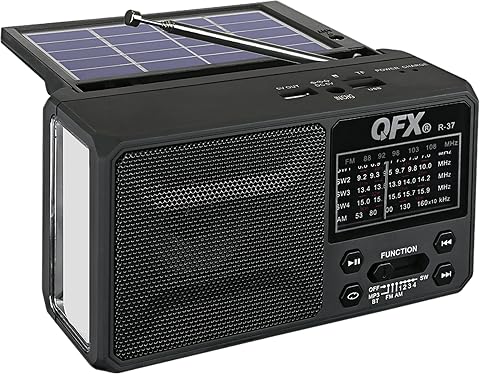
QFX R-37 6-Band Solar Radio with Bluetooth and LED Flashlight
- ✔ Radio bands: AM, FM, SW1–SW4
- ✔ Connectivity: Bluetooth, 3.5 mm audio jack, TF card
- ✔ Charging: Solar and USB

Hand Crank Emergency Radio with AM/FM, NOAA Weather Band, Solar Charging, and Flashlight
- ✔ Radio bands: AM/FM and NOAA weather band
- ✔ Power options: Hand crank, solar, and USB-C
- ✔ Battery capacity: 2000mAh rechargeable battery
Difficulty: Beginner | Time: 30-45 minutes, plus charging time
What You’ll Need
Tools & Materials:
- Solar-powered emergency radio with its supplied cable or accessories
- Radio manual or model instructions
- USB wall adapter and outlet, if the radio supports USB charging
- Phone or other small USB device to test the charging port, if supported
- Notebook or phone to record local alert frequencies and charging instructions
Knowledge:
- Basic use of buttons, switches, and a USB charging cable
- Your local weather-alert or emergency information source
Check the label and manual for battery type, charging limits, supported radio bands, and water resistance. Features vary by model. Do not assume that a solar panel, hand crank, USB port, or weather-alert function is present just because another radio has it.
FosPower A1 NOAA Emergency Weather Radio with Solar and Hand Crank, Orange
The FosPower A1 earns the top spot because it gives us the clearest set of fallback options for keeping an emergency radio available. Solar and hand-crank charging are joined by USB and four AAA batteries, so a cloudy day or unavailable outlet does not leave us with just one way to power it. NOAA weather reception directly fits the roundup’s purpose, while AM and FM add familiar broadcast choices.Its lighting is more complete than the compact model’s single listed flashlight: FosPower includes a 1W flashlight and a four-LED reading light. That can help with both moving around and illuminating a small area. An SOS alarm adds a signaling feature, and the stated 2000mAh power bank can provide a limited charge to a phone or small tablet. We should treat that capacity as emergency backup for small devices, not as a replacement for a larger battery bank.Compared with the compact hand-crank radio, FosPower is the stronger all-around kit choice, with AAA battery operation and a separate reading light. The tradeoff is extra dependence on replaceable batteries if we use that mode, and its 14.8-ounce weight is nearly twice the compact model’s stated weight. Buyers who prioritize the smallest packable radio or the highest stated flashlight output may prefer the compact option instead. Still, for a household kit where multiple ways to power the radio matter most, FosPower has the most balanced emergency feature set here.
Pros:
- Receives AM, FM, and NOAA weather broadcasts.
- Supports solar, hand-crank, USB, and four AAA batteries.
- Combines a flashlight, four-LED reading light, and SOS alarm.
- Includes a stated 2000mAh power bank for small devices.
Cons:
- AAA operation requires four separate batteries.
- The power bank is intended for small devices and offers limited capacity.
- At 14.8 ounces, it is heavier than the compact hand-crank model.
Best for: Households assembling an emergency kit who want NOAA reception, several backup power options, and both task and area lighting.
Not ideal for: Buyers who want the lightest option or expect a radio power bank to recharge larger devices extensively.
Bottom line: Choose the FosPower A1 when varied backup power and NOAA alerts matter more than minimizing pack weight.
“Choose the FosPower A1 when varied backup power and NOAA alerts matter more than minimizing pack weight.”
QFX R-37 6-Band Solar Radio with Bluetooth and LED Flashlight
The QFX R-37 takes a different route from the other two: it pairs solar charging with Bluetooth audio, stereo output, a headphone jack, and shortwave reception. Those features make it the most flexible listening device in this group for someone who wants one radio to serve outdoors and during ordinary routines. Its telescopic antenna and six listed bands, including SW1–SW4, distinguish it from the AM/FM-focused compact model and the NOAA-centered FosPower.For emergency use, however, that broader listening lineup has an important omission: NOAA weather reception is not listed. Buyers seeking official weather broadcasts should favor either FosPower or the compact hand-crank radio, both of which explicitly include NOAA. QFX also lists solar and USB charging with a removable rechargeable lithium-ion battery, but does not give the battery capacity or charging time. We therefore cannot judge how long it might run between charges or how useful its USB output would be for a phone.The plastic enclosure and unspecified battery capacity leave more uncertainty than we have with FosPower, whose power bank capacity and alternate AAA mode are stated. In return, QFX offers Bluetooth and a headphone jack that the emergency-focused models do not list. It makes the most sense when shortwave and personal audio are meaningful priorities and emergency weather alerts are covered by another device or source. For a dedicated emergency radio, it ranks behind the NOAA-equipped options.
Pros:
- Offers six listed AM, FM, and shortwave bands.
- Includes Bluetooth, stereo audio, a headphone jack, and TF card connectivity.
- Supports solar and USB charging with a removable rechargeable battery.
- Has a telescopic antenna, LED flashlight, and carrying strap.
Cons:
- NOAA weather reception is not listed.
- Battery capacity and charging time are unspecified.
- The enclosure is plastic, and its emergency lighting details are limited.
Best for: Listeners who want solar charging, Bluetooth audio, headphone listening, and shortwave bands in a portable radio.
Not ideal for: Buyers who need a radio with explicitly listed NOAA weather reception or want published battery capacity and charging time.
Bottom line: Pick the QFX R-37 for shortwave and Bluetooth versatility when NOAA alert reception is not your main requirement.
“Pick the QFX R-37 for shortwave and Bluetooth versatility when NOAA alert reception is not your main requirement.”
Hand Crank Emergency Radio with AM/FM, NOAA Weather Band, Solar Charging, and Flashlight
If our main concern is fitting an emergency radio into a backpack or small kit, this compact hand-crank model is the natural fit. Its listing gives an approximate weight of eight ounces and dimensions around five inches long, making it lighter and smaller on paper than the FosPower A1. It still covers the essentials for this category: AM/FM and NOAA broadcasts, solar charging, hand-crank power, and USB-C charging.The stated 140-lumen flashlight and siren exceeding 80dB give it a stronger emphasis on visibility and signaling than the QFX R-37, whose emergency lighting details are sparse and whose listed bands omit NOAA. Its 2000mAh rechargeable battery also gives buyers a concrete capacity figure, unlike QFX. But the supplied product information conflicts on the radio’s dimensions and weight: one source gives 5.1 × 2.1 × 2.4 inches and approximately 0.51 lb, while another gives 2.6 × 2 × 5.15 inches and eight ounces. These may describe similar dimensions in a different order, but the weight difference remains, so we should not assume an exact packed size.Compared with FosPower, this model trades the AAA option and separate reading light for a brighter stated flashlight, USB-C, and a more compact profile. FosPower remains the safer choice when we want several power paths and better-specified kit features. This radio is better suited to a lightweight go bag, especially when emergency signaling is useful, but the conflicting listing details make it harder to plan around than FosPower. Choose it when compactness and a bright beam outweigh precise specification certainty.
Pros:
- Receives AM/FM and NOAA weather broadcasts.
- Uses hand crank, solar charging, or USB-C power.
- Lists a 3W flashlight with output up to 140 lumens.
- Includes a rechargeable 2000mAh battery and loud SOS siren.
Cons:
- The supplied dimensions and weight differ between product information and description.
- No separate reading light or AAA battery mode is listed.
- Its power bank or phone-charging capability is not specified.
Best for: Backpackers and households building a compact go bag who want NOAA reception, crank and solar power, and a bright flashlight.
Not ideal for: Buyers who need consistent published dimensions and weight, a reading light, or a replaceable AAA battery option.
Bottom line: Choose this model for a compact, bright-light emergency kit, while treating its listed size and weight as uncertain.
“Choose this model for a compact, bright-light emergency kit, while treating its listed size and weight as uncertain.”
As an Amazon Associate we earn from qualifying purchases.
Before You Start
Read the safety and charging instructions before powering or charging the radio. Keep it dry unless its rating specifically allows exposure to water, and do not leave it in a hot car or in direct sun if the manufacturer warns against heat. Solar charging is usually slower and less predictable than USB charging, so treat the solar panel as a backup method. Keep the radio’s battery and any rechargeable cells within the maker’s stated limits.
Find out which stations or alert channels serve your area. Emergency radio coverage and alert features differ by country and model. Record the relevant frequencies or channel names from an official local source, rather than guessing.
Step-by-Step Instructions
Step 1: Inspect the radio and identify its features
Place the radio on a dry, stable surface and check its casing, antenna, solar panel, battery compartment, controls, and charging ports for cracks, corrosion, or loose parts. Compare the controls with the manual. Mark which functions your model actually has: AM/FM or other broadcast bands, weather alerts, flashlight, USB output, hand crank, or replaceable batteries.
Tip: Do not force a switch, antenna, or battery cover. If the casing or battery compartment is damaged, stop and contact the maker before charging it.
Check: You can identify each control and port you plan to use, and the radio has no visible damage that could affect safe operation.
Step 2: Charge the battery using the recommended method
Check the manual for the initial charging method and any battery preparation instructions. If USB input is supported, connect the supplied or approved cable to a suitable power source. If using the solar panel, place it in the kind of sunlight the manual recommends, with the panel facing the light and unobstructed. If the radio has a hand crank, follow the manual’s crank duration and pace.
Allow the stated charging period, then disconnect the cable or move the radio out of sunlight. Avoid charging unattended if the manufacturer advises against it. Never try to charge disposable batteries.
Tip: A solar charging indicator may show that the panel is receiving light, not that the battery is full. Use the battery indicator or the manual’s stated charging method to judge charge level.
Check: The radio powers on, and its charge indicator or manual-based check shows that the battery has enough charge for testing.
Step 3: Tune and save local broadcast or alert channels
Extend the antenna fully if the manual says to do so. Turn on the radio, select a supported band, and tune to a local station or official weather-alert channel. Adjust the volume to a clear listening level, then scan for a second station in case the first signal is weak. If your radio supports presets, save the useful stations according to its instructions. Write down any frequency or channel information you may need during an outage.
Tip: Reception can change indoors. Test near a window and in the room where you expect to keep the radio. Do not rely on a station or alert feature until you have confirmed that it works in your area.
Check: You can hear a local broadcast clearly, or you have confirmed the correct alert channel and know how to select it.
Step 4: Test the light and other backup functions
Test the flashlight, reading light, siren, or other functions only if your model includes them. Follow the manual to switch each feature on and off. If the radio has a USB output, connect a compatible phone or small device briefly and check whether it begins charging. Disconnect the device after the test; the radio battery may be limited and should be saved for emergency use.
Tip: A USB output may provide only a slow charge or may stop working when the radio battery is low. Keep a separate power bank for devices that need more reliable charging.
Check: Each feature you tested responds to its control, and you know which functions work only while the radio has sufficient battery power.
Step 5: Choose a storage spot and make a simple use note
Store the radio where household members can reach it quickly, away from moisture, extreme heat, and anything that could press its controls. Keep its charging cable, manual, and any approved spare batteries together. Attach a note with local station or alert information, the charging instructions, and a reminder to test the radio periodically.
Tip: If the radio is part of an emergency kit, put it near a flashlight, spare batteries, and a printed contact list. Do not store it where a sealed container could trap heat or moisture.
Check: A household member can find the radio and its instructions without searching, and the note contains the information needed to tune it and recharge it.
Common Mistakes to Avoid
- Leaving the radio in a hot, damp, or hard-to-reach storage location. — Choose a cool, dry, accessible place and follow the manufacturer’s storage guidance.
Troubleshooting
Problem: The radio powers on but receives static or no clear station.
Solution: Extend and reposition the antenna, move near a window or outdoors if safe, and try another confirmed local station. Check that the selected band matches the station. If reception remains poor, consult local emergency communications guidance for coverage in your area.
Problem: The solar panel does not appear to charge the radio.
Solution: Check the manual for the panel’s required light conditions and charging indicator. Remove shade or dirt from the panel, reposition it as directed, and allow more time. Use an approved USB charging method if available; solar charging can be slow and may not work well through glass or in weak sunlight.
Problem: The radio shuts off or its battery indicator drops quickly.
Solution: Recharge it by the recommended method, reduce the volume, and switch off lights or other features when not needed. If the radio still loses charge quickly after a full charge, check battery replacement instructions or contact the manufacturer.
Problem: A phone does not charge from the radio’s USB port.
Solution: Confirm that the radio supports USB output, that its battery is charged, and that you are using the correct port and a compatible cable. Try a brief test with another compatible device. Do not force a connector or rely on this feature as your only emergency power source.
What Success Looks Like
The radio powers on, receives a confirmed local broadcast or alert channel, and operates any tested light or backup features. You have recorded local tuning information, know the approved charging method, and have stored the radio with its instructions and accessories in an accessible, dry place.
Next Steps
Check the radio on a regular schedule, such as when you review the rest of your emergency kit. Confirm that it still powers on and receives a local station, then recharge it according to the manual. Replace disposable batteries before their expiration date, and inspect rechargeable batteries for damage or swelling. Update your station note if local emergency information changes. If the radio fails a basic check, replace it or contact the manufacturer before the next outage.
Frequently Asked Questions
Can a solar-powered emergency radio stay charged just by sitting in sunlight?
Usually, sunlight alone is not a dependable way to keep the battery full. Charging speed depends on sunlight, panel size, angle, and the radio’s battery. Follow the manual and check the battery indicator; use an approved USB charge when you need a more predictable charge.
How often should I test the radio?
Test it during regular emergency-kit checks and after long storage. A brief power-on and local-station check can reveal a dead battery, damaged cable, or reception problem before an outage.
Can I leave the radio plugged in all the time?
Follow the manufacturer’s guidance. Some models manage charging automatically, while others may not be designed for continuous connection. Disconnect it if the manual instructs you to, and keep it away from heat and moisture while charging.
Will the radio charge my phone during an emergency?
Only if the model has a USB output, and the amount of power may be limited. Check the specifications and test the port in advance. Keep a separate power bank and cable for more dependable phone charging.